
JQuery
Displaying 1 - 2 of 2once() function javascript jQuery drupal, function reference

By effectively using the once() function, you can write robust and performant JavaScript for your Drupal applications that gracefully handles AJAX updates and ensures your code executes exactly when and how you intend.
Code Snippet
(function (Drupal, once) {
  'use strict';

  Drupal.behaviors.myCustomBehavior = {
    attach: function (context, settings) {
      // Select elements that haven't been "onced" yet with the ID 'my-unique-id'.
      // 'context' is typically the part of the DOM that was just loaded or updated.
      // '.my-selector' is your CSS selector for the elements you want to target.
      const elementsToProcess = once('my-unique-id', '.my-selector', context);

      // `elementsToProcess` is an array of DOM elements that haven't been processed
      // with 'my-unique-id' yet.
      elementsToProcess.forEach(function (element) {
        // Your JavaScript code to run only once per element.
        // `element` is a native DOM element, not a jQuery object.
        console.log('Processing element:', element);

        // Example: Add a class
        element.classList.add('processed-by-my-behavior');

        // Example: Attach an event listener
        element.addEventListener('click', function() {
          console.log('Click event fired on a processed element!');
        });

        // If you still need jQuery for something specific within the loop,
        // you can wrap the native element:
        // $(element).css('background-color', 'lightgreen');
      });

      // To process the <body> or <html> element only once per full page load,
      // you can use 'html' or 'body' as the selector and omit context (or pass document).
      // Note: `once` returns an array, so if you expect only one, you might destructure or use .shift()
      const [htmlElement] = once('my-global-script', 'html', document);
      if (htmlElement) {
        // This code will run only once when the page fully loads.
        console.log('Global script initialized on HTML element.');
      }
    }
  };
})(Drupal, once);
Display Forms in a Modal Dialog
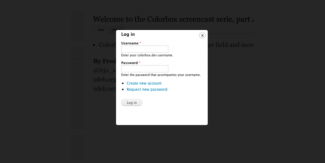
Display create a node in a modal dialog
By default when creating a node, the save action will redirect the user to another page but if we want to just close the modal dialog and leave the user on the same page we need to tell the form to do that.
For this we are going to alter the form and add an AJAX command letting Drupal know that we want to close the dialog as soon as the node is created.
Code Snippet
use Drupal\Core\Form\FormStateInterface;
use Drupal\Core\Ajax\AjaxResponse;
use Drupal\Core\Ajax\CloseModalDialogCommand;
use Drupal\Core\Ajax\RedirectCommand;

/**
 * Implements hook_form_alter().
 */
function modal_form_example_form_node_article_form_alter(&$form, FormStateInterface $form_state, $form_id) {
  $form['actions']['submit']['#submit'][] = '_modal_form_example_ajax_submit';
  $form['actions']['submit']['#attributes']['class'][] = 'use-ajax-submit';
  // in some cases this was needed:
  // $form['#attached']['library'][] = 'core/jquery.form';
  // $form['#attached']['library'][] = 'core/drupal.ajax';
}

/**
 * Close the Modal and redirect the user to the homepage.
 *
 * @param array $form
 *   The form that will be altered.
 * @param \Drupal\Core\Form\FormStateInterface $form_state
 *   FormState Object.
 */
function _modal_form_example_ajax_submit(array $form, FormStateInterface &$form_state) {
  $response = new AjaxResponse();
  $response->addCommand(new CloseModalDialogCommand());
  $form_state->setResponse($response);
}